This is a command line toolkit for comparing different classification models.
Positional arguments:
dataset_filename
= CSV data file
model
= a single choice from the list {ALL, shared_covariance_model, knn, multiclass_logistic_regression, naive_bayes, multilayer_perceptron, random_forest, linearSVC}
Optional arguments:
h
= show the help screen, and explanation of interface commands
a
= choose an accuracy metric (default=precision, choices= {accuracy, precision, f1, recall})
half
= run with only half the training data
-explore_dataset_histograms
= display histograms and charts comparing data features (
will have no effect on model outputs - this is used only to show independent graphs that explore the data
)
Plotting: Any plots created will be shown on screen after the code has finished executing. You will also be able to find these plots saved in the
submission/plots
directory
Check out the GitHub repo for more information on features and sub-commands.
For my MSc Computer Science final project, I was lucky enough to be given the chance to work with Microsoft and Great Ormond Street to develop a cross-platform app for an upcoming clinical research trial. The trial focusses on understanding how people with cystic fibrosis approach their treatment, and how effective different treatment methods can be.
Research into cystic fibrosis is a hugely important area to me, and this app is my proudest achievement to date. There are plenty of things I’d do differently if I were to start again from scratch now, but knowing I’ve contributed towards giving people with CF more freedom in their treatment is priceless.
I won’t go into too much detail here (I wrote a
103-page report
about the project if you really want to get into the weeds), but here’s a brief rundown.
Background
People with CF have an incredibly high treatment burden. In fact, for most people with CF, staying healthy means spending an average of two hours of every day on their treatments. Airway clearance treatments (ACTs), a form of chest physiotherapy used to clear sticky mucus from the lungs, are commonly regarded as the worst and most time-consuming of these treatments. One of the most pressing questions in the field is whether people with CF can replace these ACTs with exercise without sacrificing their health.
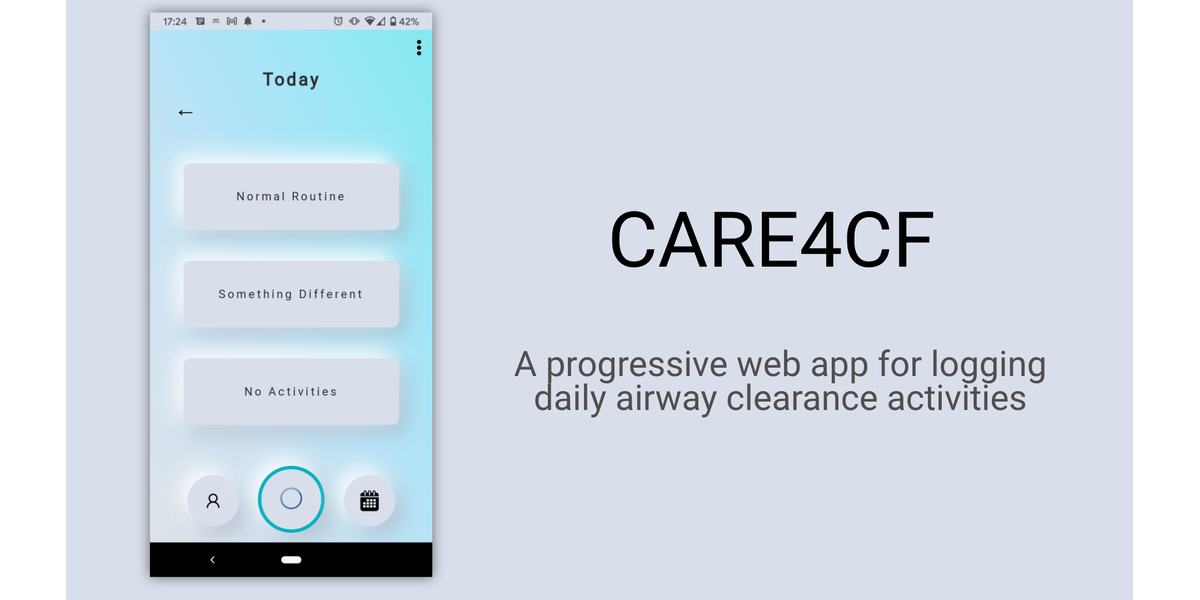
The CARE4CF app is to be used by people with CF to track the extent to which they stick to their daily airway clearance plan. It encourages users to log each day whether they have completed their normal airway clearance routine, something different (and if so, what), or no activities.
This app forms the data-gathering backbone of the CARE4CF trial; the data gathered is combined with Fitbit data and used to paint a picture of the impact of exercise compared to ACTs on patient health.
About the App
Cross-platform accessibility was super important to this project, so I built the app as a
progressive web application
, or PWA. PWAs are an exciting new development in web protocol; they combine the reach of web applications (i.e. anyone with a browser can access them), and the capabilities of native applications (i.e. device-specific features such as push notifications, camera access, etc.).
This made cross-platform access super easy, but things like caching policy and auth pretty hard. PWAs are new and exciting, but that meant there wasn’t a great deal of detailed documentation out there. I was fortunate to work with Microsoft’s
PWABuilder
team just as they were building their awesome
pwa-auth
resource. Enabling scheduled and custom notifications took me a long time to crack; it taught me a lot about the difference between
Push API
and
Notification API
, both of which are built on top of the service worker architecture.
Ease of use was a top priority. The number of clicks necessary to log activities had to remain at an absolute minimum. Users could save their most common routines and save one as their ‘normal’, meaning it only takes two taps to log your normal routine. If users hadn’t logged their normal routine in while, they received a prompt to change which routine was saved as their normal. The app came with an optional ‘gamification’ feature in which your daily logging streaks were tracked and displayed.
Data privacy was another large concern. I developed a separate web app where users could register for the wider CARE4CF trial using their Microsoft login. The PII from their login was given an anonymous unique identifier and stored in a separate database, intended to be kept on an NHS secure portal. Upon logging into the main CARE4CF app, the email address is used to retrieve the anonymous ID. This ID is used as the only identifier from that point on.
The app had to be maintainable by a small team of non-technical admins. I built an admin panel using
ForestAdmin
, from which admins could send custom notifications, gain insights into how the app is used, amend any of the app content, and edit the treatment options available.
Thoughts
I had an awesome time developing this app, and I learned an incredible amount. As with all good projects, there are things I’d do differently next time around. For example, I’d use a frontend framework (I’ve since become a fan of vue.js) instead of going in with EJS, HTML and CSS. I’d also use more open source tooling to manage the notification ecosystem. But that’s progress.
I’ve become a huge advocate for PWAs, and I’ve enjoyed being a guest speaker at several
Microsoft talks
as a result. I’m also proud to have contributed to Microsoft’s
Educator Developer Community
to cover the experience. But above all, I’ve loved contributing to a cause that means a lot to me, and to have played a small part in answering a question that can improve the quality of life for many.
Check out my blog for Microsoft’s Educator Developer Community ⬇️
This is a relatively simple CLI application that uses Python and an American dictionary to solve wordle challenges. Just enter your progress and you’ll be presented with a list of possible solutions. I swear I’ve never actually used it to cheat.
sausage-classifier
is a classification model toolkit. It started as a means of comparing computer vision models (a simple local CNN vs a fine-tuned pretrained vision transformer from Hugging Face), but has evolved more into an exploration of using webscraping to gather training/test data.
Upon running the model training script, if no
input/
directory exists, one is created and populated with images using
BeautifulSoup
webscraping. These queries are read from an
image_queries.json
file, and the images are written to a directory structure to suit Pytorch’s
ImageFolder
dataset framework. I’ve pitched this as a sausage-detection model, but could just as easily be an anything-detection model depending on how you populate the
image_queries.json
file.
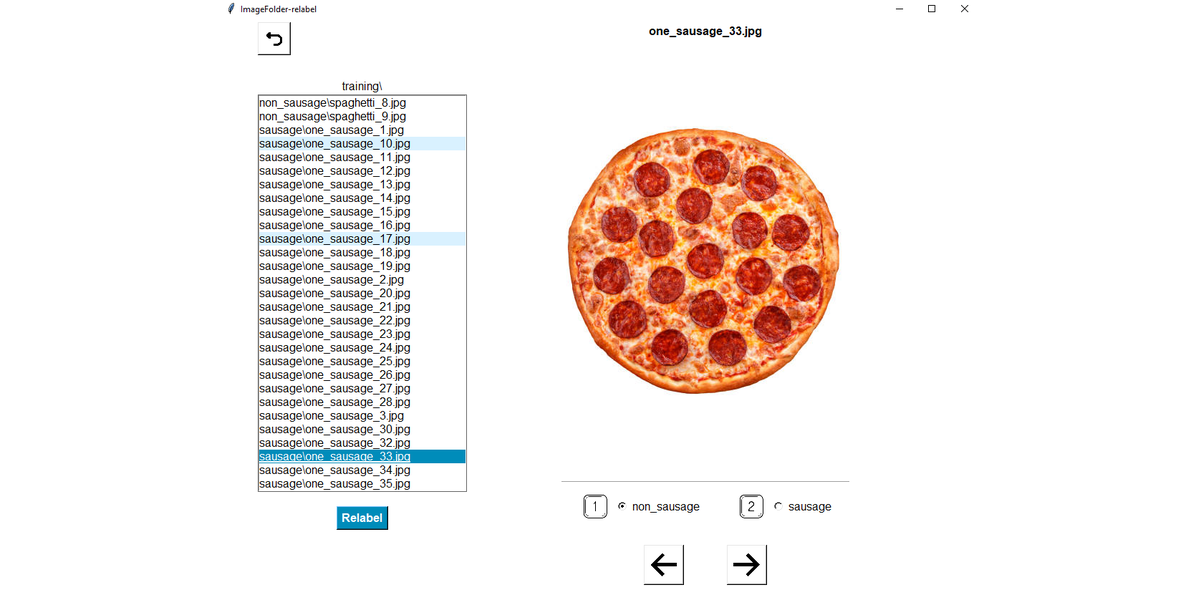
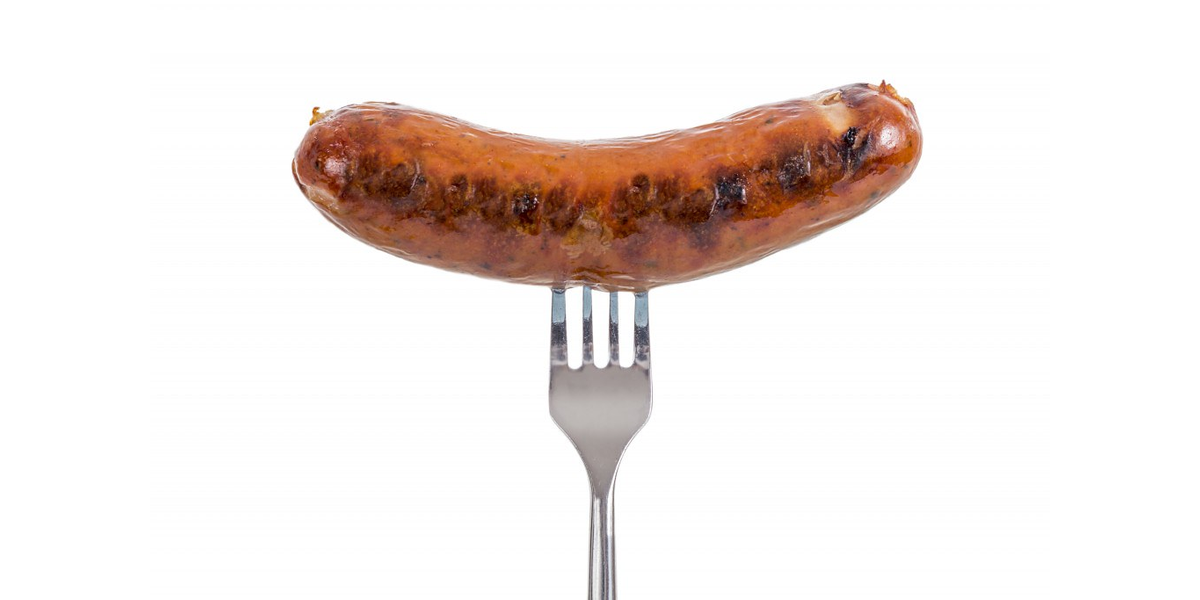
When scraping sites such as Google Images, Shutterstock and iStock, each query returns ~20 results. The first few results in a query are pretty good, and will probably look like the one in the image above. But by the 19th or 20th image, you’re scraping sausage dogs and pepperoni pizza. Both lovable, but neither are sausages.
This problem persists when you add slightly varied search queries (’one sausage’, ‘short sausage’, ‘single sausage’, etc.), not to mention duplicate images also become a feature in the training set.
I wished there was a lightweight, Voxel51-style relabeling tool that was suited to the
ImageFolder
framework. I wanted to be able to whizz through my scraped image set, identify which images didn’t belong and automatically do a bulk refactor of those files, placing them in the subdirectory corresponding to their new label. I decided to build one:
imagefolder-relabel
.
This will continue to be a work in progress as I explore new techniques of curating a messy dataset. Here are other some areas I’d like to explore in no specific order:
Using KNN clustering to highlight outliers within a label, and prioritise them for relabeling
Flag or remove duplicate images, potentially using SciKit’s
cosine_similarity
or the
imagehash
library’s
average_hash
function
Using bounding boxes to improve the model’s localisation on sausages
Using generative neural networks to build synthetic data from a subset of webscraped data
Generate synthetic data using a script to compose sausage images over other images (my talented friend
George Pearse
developed
ImageComposer
for this purpose)
Check out the repo for source code and more information ⬇️
While tinkering with my
sausage-classifier
, I soon realised that webscraped datasets could be messy. When querying for sausages, I’d eventually end up scraping pictures of sausage dogs, sausage pizzas and various non-sausage images. I wished there was a lightweight
Voxel51
-style relabeling tool that worked for Pytorch’s
ImageFolder
framework, where you could reassign labels and automatically refactor the images according to their new label. I decided to build one.
The result is a TKinter package that integrates with an existing classification pipeline. Simply point it at your top-level image directory and start relabeling.
Draw bounding boxes by clicking and dragging over the image. These are written to a JSON file to be exported to your model training pipeline.
I wanted to place a focus on ease-of-use, and in particular, prioritising key bindings over clicking. With one hand on the arrow keys and another on the number keys you’ll be able to whizz through and relabel.
I was also keen to build it as an offline GUI rather than a locally hosted server, keeping the loading time for images at an absolute minimum.
There’s plenty more I could add (using KNN clustering to identify outliers and prioritise images most likely to need relabeling?), but I wouldn’t want to sacrifice too much simplicity and ease of use.
Check out the code, instructions and more details ⬇️
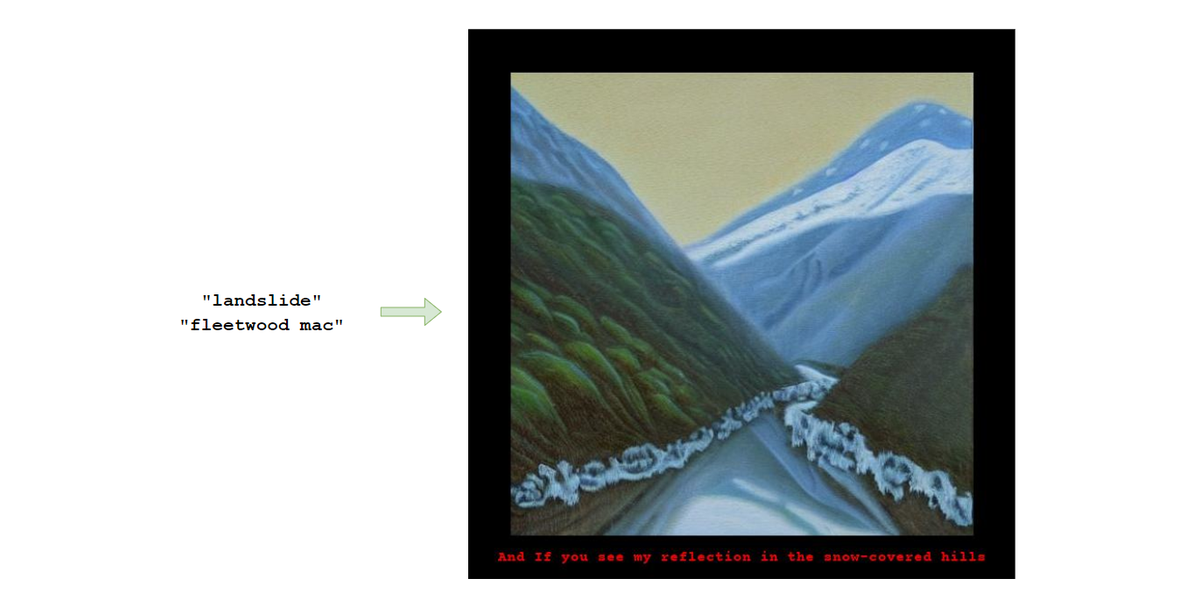
This is a lightweight app that takes a song title and artist as arguments, and uses
stable-diffusion
to generate an image influenced by the lyrics.
I was keen to keep the script lightweight and to avoid downloading excessively heavy model weights, so the image generation is currently done via the
Hugging Face Inference API
. This script serves as a proof of concept.
The Genius API is used (via the
lyricsgenius
wrapper) to webscrape the song lyrics, which are cleaned and processed. This includes removing common lines that are mistakenly webscraped but are not part of the lyrics (i.e. ‘You might also like’), as well as anything within parentheses (often some variation of “whoah-oh”). A summarizer model is used to extract a key lyric, which is inserted into an image prompt. The image is returned and annotated with the lyric.
Users can choose between summarizer models. Different summarizers may select different lyrics, therefore generating different images. Sometimes the differences are subtle but complement each other, for example:
Teenage Dirtbag by Wheatus:
luhn-summarizer
Teenage Dirtbag by Wheatus:
lsa-summarizer
This is primarily an NLP task centered around converting lyrics, which may be abstract and decorative, into a vivid image prompt. There’s plenty more room for exploration here, and I have a relatively long list of methods I’d like to experiment with. However, as an MPV, I’ve found that consistently good results are generated by using an extractive summarizer model to return a central lyric, and using this, the song title and the artist as a basis for the prompt. Using ‘oil painting’ as a style seems to help return consistently strong results; I suspect that using a ‘classical’ style helps to dampen the abstract nature of some lyrics towards something more tangible.
There’s plenty of room for exploration here, and I see this being an ongoing project as I continue to tinker with using NLP for prompt engineering.
Next Steps
Prompt Generator
I’ve found that using abstractive summarizer models, i.e. generating an original piece of text to summarize the lyrics, tends to overcomplicate things and yield worse results. Also, this approach is harder to associate with one lyric for the caption.
However, I’d like to try using a
prompt generator model
to expand upon the chosen lyric. This may help to bridge the gap between an abstract lyric and a concrete, vivid prompt.
Weighted Prompts
I’d also like to experiment with
assigning weights
to the image prompt. Including the song title and artist in the prompt helps the results because it provides useful context, but in some cases where the lyric is ‘weak’ and/or the artist is particularly well known, the prompt defaults to an image of the artist (see
Gallery
below, particularly Dua Lipa and Sylvan Esso). This is cool in some cases, less in others.
Ideally I’d give the lyric a larger weight than the title and artist. Using
Ceilings
by Lizzie McAlpine as an example, this can be the difference between just returning an image of a ceiling, and something more beautiful that is influenced by the lyrics. To compare:
Too much emphasis on the song title,
Ceilings
More ethereal and beautiful, more suited to the lyric
Contextual Lyric Selection
Sometimes the summarizer model chooses a single line from the lyrics that might work better with the subsequent (or preceding) line included. For example, using
My Fonder Heart
by Anais Mitchell, the
luhn-summarizer
extracted lyric is “
Way over yonder, I’m waiting and wondering”.
This would work better, and be given more context, if the subsequent line was also included: “
Way over yonder, I’m waiting and wondering / Whether your fonder heart lies”
.
To achieve this, I’d like to experiment with ‘prosifying’ the lyrics, i.e. converting the text to a passage of natural prose. After converting the lyrics to plaintext, I would use a
punctuator model
to add the necessary punctuation. I would then use the summarizer to extract a key sentence, hopefully with a better sense of grammatical context (though I’d ideally set a maximum sentence-length).
Web App
My ultimate plan is to treat this as a the backend for a web app with slick UX. I imagine users logging in with Spotify, then choosing from their playlists, most-played songs, etc, to generate images.
Ideally I’d like to add the ‘
spotify code
’ (a unique QR code representing a song) to the top of the image, though I’m yet to find a way to generate these programmatically.
Users could even generate a beautiful ‘scrapbook’ to represent a playlist, with one image per song. Users could order products with a print of their favourite songs.
To allow scaling in this way, I’d switch model access away from the rate-limited Inference API to the Hugging Face
production-ready inference endpoint
.
More
Check out the github repo for more information, code and instructions ⬇️
lyric vision
is a mobile app that serves as a frontend for
song-to-image
, a lightweight python app to generate lyric-inspired artwork from a given song.
Just enter a song title and artist to generate artwork inspired by the song’s lyrics.
The song-to-image script uses the Genius API to scrape the song’s lyrics, summariser models to extract a prominent line, and stable-diffusion to generate artwork. The mobile app is written using React and Django, developed using Expo Go and tested on Google Pixel 6.
In generative AI, the same prompt can yield different results. The same song can return separate images:
Future Work
There’s still plenty I’d like to do with this app. Below are some next steps.
Customising Parameters
I’d like to add a ‘Settings’ option that allows users to specify the summariser model used to extract the key lyric. Currently this defaults to LSA, but good results can also come from Lex and Luhn models.
I’d also like to allow users to specify the style used in the image prompt. At the moment this defaults to ‘oil painting’ because I find this yields consistently strong results and I like the unified style, but I’d ultimately like users to be able to specify a given style.
Spotify API
Allowing users to log in using Spotify SSO would allow me to take advantage of the Spotify API. I’d like to integrate the Spotify API into the search function to validate songs before they are submitted, rather than just allowing free text input.
I’d also like to try using the Spotify API to suggest a user’s most popular songs, allowing one-click image generation instead of manually inputting songs.
Scrapbook
This will require more stable-diffusion credits, but I’d ultimately like to allow users to generate a ‘scrapbook’ from a given spotify playlist. One image would be generated per song, and the output would be collated into a beautiful format.
More
Check out the repo for more information and code ⬇️
https://github.com/JordanJWSmith/songart-app
Check out
song-to-image
for more information about the image generation backend, and for a gallery of examples.
In April 2023 I took part in a 24-hour generative AI hackathon hosted by Sarah Drinkwater and Victoria Stoyanova. The brief was simple: turn up, pitch ideas, form teams and build it. The event began at 4pm on Friday and finished at 8pm on Saturday.
My team was formed around the idea of creating engaging summary videos from podcasts. Podcasts can contain a lot of valuable information and are great for education, but not everyone enjoys listening to a 60-minute recording. We wanted to build a product that could convert your podcast into engaging educational short videos for any audience.
So we built it! In 24 hours we built and deployed
Dancing Spiders
, allowing users to upload an mp3 recording and receive a short video summarising the content.
We pitched our product to a panel of judges, and came second in two categories.
How We Did It
We used OpenAI’s
Whisper
to generate a transcription from the podcast recording. Then, we used GPT-4 to return a five-sentence summary of the text. If the text exceeded GPT-4’s token limit, we separated the text into appropriately sized chunks.
We used
ElevenLabs
text-to-speech API to generate voice renditions of our summary text. These were spookily realistic. We also used GPT-4 to convert each of the five sentences in the summary into a vivid image prompt in a storybook style. These prompts were sent to the stable-diffusion API to return images.
Finally, we used Python to combine the images and voiceover into a short video to return to the user.
Reflection
The experience was inspiring. I found it incredibly motivating to be in a room full of passionate people who are excited just to build cool stuff. It’s amazing what motivated people can achieve when they get into a room together, and the weekend proved how easy it should be to make the change you want to see. I can’t wait to do it again.
This is a python toolkit to source and display multimodal embeddings for live property listings on Rightmove.
The property market is brimming with insights, but much of this data goes to waste. In a world of smart recommendation algorithms, the real estate market seems to be one of the only industries still reliant on hard filters and endless scrolling. The market is stacked against buyers and renters; I’d like to explore using AI to tip the balance back in their favour.
It consists of four modules:
Webscrape recent Rightmove listings for a given London borough
Classify property images
Generate multimodal embeddings for features, text and images
Display interactive embeddings
Webscraper
For any given location, the webscraper scrapes a given number of pages to retrieve >100 datapoints for each listing.
It outputs this data in a .json file, and includes the most useful datapoints in a .csv file.
Image Classifier
The image classifier currently uses a
ViT model finetuned on real estate data
. It outputs 30 classes, some of which are a little niche for our use case. This model acts a placeholder, with the intention of replacing it with our own model finetuned on London real estate images.
The classifier takes the csv file from the previous step as an input, and saves it with an added column containing a prediction for each image.
This step highlights the obvious gaps in information present throughout the London property market.
Generate Embeddings
Multimodal embeddings are generated for numerical features (price, bedrooms, bathrooms, etc), categorical features (lease type, property type, etc), location data (latitude/longitude), text data (property summaries and description) and image data.
Work still needs to be done on the weightings associated with these embeddings; this approach will allow for personalised recommendations that get better with more use.
Ultimately, I’d like to filter these embeddings by image type to compare properties with similar kitchens, facades, etc. I’ve been experimenting with using CLIP for a semantic image search for a given image type.
Visualise Embeddings
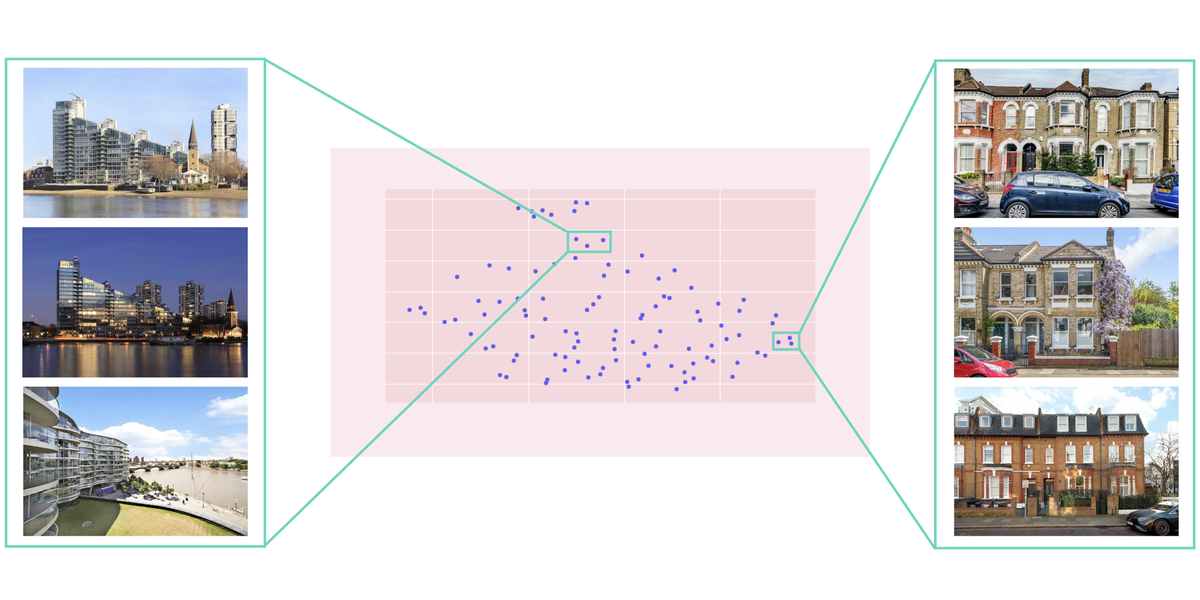
Finally, the pipline spins up a custom dash server containing an interactive plotly graph. Users can click on embeddings to view the property, and explore those properties closest in feature space.
I’m still experimenting with projection methods (PCA vs UMAP etc), and how best to approach dimensionality. Early results show some good clusters, i.e. terraced houses vs riverside apartments.




.gif)
.gif)
.gif)
.gif)


